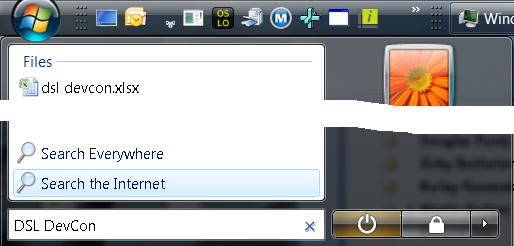
Add "Search the Internet" Back to the Win7 Start Menu

Windows 7 took away a feature I use all the time, as shown on the right: Search the Internet.

Here's what I did all day, every day in Windows Vista: Ctrl+Esc to bring up the Start menu, then I start typing. If I'm searching on my HD, I immediately get matches and I can choose one with just the arrows and the Enter key. If I'm typing in the name of a program in the Start menu, I get those matches and choose one. If I want "calc" or "notepad" I can just type those and those work.

However, 80% of the time, I want to search the internet, so enter my search term, optionally including attributes like "site:", I press, down-arrow once, highlight "Search the Internet" and press Enter. This brings up my default browser with my search results in my default search engine without me having to move the mouse or open the browser and wait for the home page or even decide where I want the search results to come from until after I've entered my search phrase.

And we took it out of Windows 7. : (

But, Shawn VanNess has shown me how to put it back! : )

Download this zip file, execute the .reg file, press Yes and OK a bunch, kill and restart the explorer.exe process and the next time you do the Ctrl+Esc+type+something dance, you'll see your old friend "Search the Internet" right back on the Start menu where Bill intended it to be. Thanks, Shawn!


Comment Feed 11 comments on this post

king kikapu:


Hmmm..download link does not work!

Friday, Sep 4, 2009, 12:48 AM


yuriy:


Try also the Start++ utility

Friday, Sep 4, 2009, 4:32 AM


Geoff Weinhold:


404 on the link Chris.

Friday, Sep 4, 2009, 8:21 AM


Rob Cannon:


The file link does not work.

Friday, Sep 4, 2009, 8:44 AM


Anthony Mastrean:


It's an option in Group Policy. The first item in User Configuration\Administrative Templates\Start Menu and Taskbar.

Friday, Sep 4, 2009, 10:08 AM


Chris Sells:


Link fixed.

Friday, Sep 4, 2009, 10:26 AM


TomWij:


Links works fine now, thank you! :-)

Saturday, Sep 5, 2009, 6:29 AM


Justin Chase:


One extra tip: pressing the Windows key is the same as Ctrl+Esc. Saves a little finger stretching (presuming your keyboard has a windows key).

Saturday, Sep 5, 2009, 11:25 AM


Shawn Van Ness:


Even better (?) you can add Bing as a search connector...

http://www.bing.com/community/blogs/developer/archive/2009/07/16/how-to-integrate-bing-into-windows-explorer-in-three-minutes-or-less.aspx

Then of course you can add specialized search connectors for MSDN, or anywhere else you like*. You can select up to 5 (I think) to appear in the start menu.

*With the restriction that they support OSDX format search API (returning search results in a RSS format). So, no google or wikipedia, yet.

Thursday, Sep 17, 2009, 4:58 PM


:


Monday, Jan 3, 2011, 1:07 PM


:


Monday, Jan 3, 2011, 1:07 PM


comment on this post

HTML tags will be escaped.

Powered By ASP.NET

Hosted by SecureWebs

Mensa

IEEE


moving companies
sunglasses
Kratom
How To Lose Weight Fast
Play Bingo Online
Comcast Xfinity Internet
Online Payroll Services