Win7 killed a feature I love in Vista!
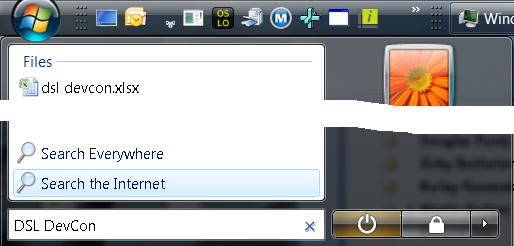
All my friends have updated to Windows 7. My 14-year old son is running Win7. I'm the only one I know that's not running Windows 7. The reason? Windows 7 took away a feature I use all the time, as shown on the right: Search the Internet.
Here's what I do all day, every day in Vista: Ctrl+Esc to bring up the Start menu, then I start typing. If I'm searching on my HD, I immediately get matches and I can choose one with just the arrows and the Enter key. If I'm typing in the name of a program in the Start menu, I get those matches and choose one. If I want "calc" or "notepad" I can just type those and those work.
However, 80% of the time, I want to search the internet, so enter my search term, optionally including attributes like "site:", I press, down-arrow once, highlight "Search the Internet" and press Enter. This brings up my default browser with my search results in my default search engine without me having to move the mouse or open the browser and wait for the home page or even decide where I want the search results to come from until after I've entered my search phrase.
And they took it out of Windows 7. : (
I logged the bug and heard nothing.
Does anyone know of I 3rd party program I can run that will work exactly like the Vista Start menu under Windows 7? Please?
Chris Sells
,
Friday, April 17, 2009 11:43 AM
Read this:
http://blogs.msdn.com/e7/archive/2009/03/23/federating-windows-search-with-enterprise-data-sources.aspx
and this:
http://www.sevenforums.com/tutorials/557-start-menu-add-search-internet-link.html
Alastair Upton,
Friday, April 17, 2009 1:12 PM
Have you tried launchy for searches? Much better than the windows one you blogged about! Http://www.launchy.net
John Justin,
Friday, April 17, 2009 2:20 PM
I second that.
Launchy will solve your issue, and many others you didn't even know you had...
TonyS,
Friday, April 17, 2009 2:57 PM
I used to do Launchy, now I'm onto http://www.executor.dk/. Way more powerful and looks almost as good.
Ted Jardine,
Friday, April 17, 2009 4:06 PM
I love launchy and use it usually in place of ctrl-esc.
Shawn Wildermuth,
Friday, April 17, 2009 4:26 PM
I'm a launchy guy too.
kenny@sourcetonuts.com,
Monday, April 20, 2009 3:32 PM
Will it be wrong to tell a Microsoftie to use a Google product? Google Toolbor 6 for IE gives you a quick search box/ bar which you can launch by selecting one of the few shortcuts like windows key/ Ctrl + Space (This is big NO for VS developers as it replaces auto complete) or Ctrl twice and so on. It does a neat job and is light enough on RAM. SOme people have reported issues on this but worked for me so far. Here is the link: http://toolbar.google.com/T6/intl/en/index.html
Hope this does the job for you.
Hemant,
Monday, April 20, 2009 5:59 PM
Before i got my mac I used enso. Enso vs Launchy on google leads to a good comparison.
Enso,
Tuesday, April 21, 2009 3:24 PM
Again, Launchy is the right answer :)
Krasimir Evtimov,
Wednesday, April 22, 2009 11:45 PM
[HKCU\Software\Policies\Microsoft\Windows\Explorer]
"AddSearchInternetLinkInStartMenu"=dword:00000001
ShawnVN,
Monday, April 27, 2009 1:00 PM
Shawn, have I ever told you that I love you?!
Chris Sells,
Monday, April 27, 2009 6:42 PM
This is one of the features I really hate about the Vista start menu (actually using Server 2008). If I want to search the web I'll open my browser, if I want to search the file system I'd rather open a search window, or use the textbox in windows explorer. When did Microsoft become so over-focused on search? I used to be able to add icons to the top level of the start menu and, for example, press WinKey, then 'E' to launch Excel. Now all I get is the letter 'e' in a search box.
David,
Wednesday, June 03, 2009 7:38 AM
Reply
to this news
Marquee de Sells
|